Notice for non-Serbian speakers
This page need to be translated into English. Please, send support questions and feature requests to Time Machine WP forum. There is already bug report thread, so please use it if you spot some bug. Thanks!
Šta je Time Machine?
Time Machine je dodatak za WordPress platformu za blogovanje i omogućava izlistavanje izabranog broja najstarijih članaka na blogu poslatih istog dana minulih godina.
Odakle da preuzmem Time Machine?
Time Machine dodatak možete da preuzmete odavde: Time Machine 0.0.6 (107)
Kako se instalira?
Preuzetu datoteku raspakujte pomoću arhivera (preporučujem 7zip), a potom dobijeni direktorijum time-machine pomoću FTP klijenta (preporučujem program FileZilla) postavite na server u direktorijum wp-content/plugins/.
Time Machine možete da instalirate i direktno iz Kontrolne table svog bloga pomoću opcije Dodaci → Dodaj novi tražeći pojam Time Machine. Pošto pronađete dodatak, i instalirate ga kao i svaki drugi, aktivirajte ga.
Kako se aktivira?
Idite na stanicu Dodaci → Dodaci na Kontrolnoj tabli, pronađite Time Machine u odeljku Isključeni dodaci i kliknite na vezu Uključi na desnoj strani.
Dodavanje vidžeta
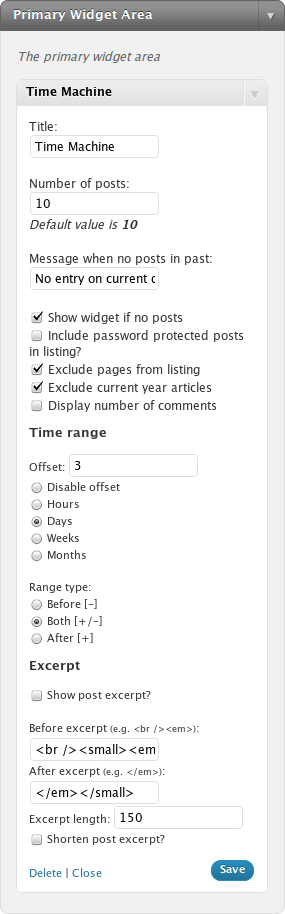
Da bi podesili opcije dodatka Time Machine morate ga prvo dodati u bočni meni svog bloga. Posetite odeljak Izgled → Vidžeti, sa leve strane u spisku vidžeta pronađite Time Machine i prevucite ga u željeno polje za vidžete. Preostaje još samo da ga podesite
Podešavanje vidžeta
Vidžet Time Machine može da se prilagodi potrebama korisnika, i to sledeće opcije:
- Naslov vidžeta
- Broj članaka koji će biti izlistani
- Poruka koja će biti ispisana kada nema članaka objavljenih minulih godina na tekući dan
- Da li treba izlistati članke zaštićene lozinkom [0.0.2]
- Zanemarivanje Vordpres strana [0.0.3]
- Zanemarivanje članaka objavljenih u tekućoj godini [0.0.3]
- Prikaz broja komentara iza naslova zapisa [0.0.4] — predložio Deda
Poređenje na osnovu datuma po Griniču (GMT) umesto poređenja po vremenskoj zoni servera [0.0.5]- Da li treba prikazati vidžet ako nema članaka objavljenih u prošlosti [0.0.5.3]
- Vremensko razdoblje koje pokriva period od N sati/dana/nedelja/meseci pre/posle/pre i posle trenutnog vremena [0.0.5.5svn]
- Računanje vremena po vremenskoj zoni postavljenoj u Vordpresu [0.0.6]
Kako se koristi?
Kada se aktivira i podesi, dodatak Time Machine sav posao obavlja sam. Prilikom prikaza stranice dodatak uzima tekući datum (dan, mesec i sat) i u bazi traži članke koji su proteklih godina objavljeni u razdoblju podešenom u opcijama. Ukoliko pronađe članke koji ispunjavaju taj uslov, ispisuje spisak članaka sa godinom iz koje je članak i naslovom članka kao vezom do pojedinačne stranice. Spisak se nalazi u vidžetu unutar bočnog menija.
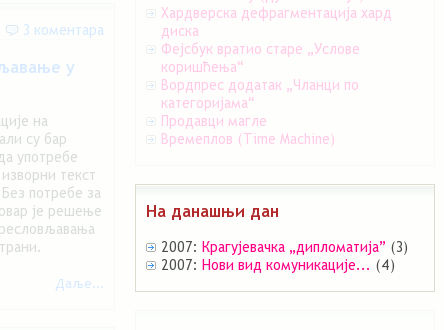
U slučaju da Time Machine ne pronađe članke objavljene tekućeg dana, ako nije aktivirana opcija da vidžet bude sakriven, umesto spiska ispisuje poruku o tome kao na slici dole.

Izgled vidžeta Time Machine kada nema članaka
Karakteristike dodatka
- ispisuje samo članke koji su javno objavljeni, pri čemu nacrte ne navodi
- poštuje privatnost bloga i ne ispisuje članke koji su zaštićeni lozinkom
- podesivi naslov vidžeta, broj prikazanih članaka, poruka za slučaj nepostojanja članaka i prikaz broja komentara
- lagan i brz
- omogućena lokalizacija na druge jezike (podrazumevani jezik engleski, dolazi sa prevodom na srpski jezik)
- generiše validan XHTML 1.1 kôd
- koristi generičke CSS stilove teme
- opcija za izbor da li će se prikazivati članci zaštićeni lozinkom ili ne
- opcije za zanemarivanje Vordpres strana i članaka objavljenih u tekućoj godini
Za uraditi
veze ne funkcionišu (vode na stranu 404) kada nije aktivna naslovna stranicaopcija za izbor da li će se prikazivati članci iz tekuće godine na tekući dan, ili ne
Zahvale
Zahvaljujem se svima koji testiraju Time Machine u probnom periodu i prijave greške, te predlože nove mogućnosti. Takođe se zahvaljujem za prevod Đorđu na italijanski, Lesliju na pojednostavljeni kineski i Ilji za beloruski jezik.


Sve sam namestio kao sto si naveo u postu, ali imam jedno pitanje: Na danasnji dan pre godinu dana sam napisao post, ali se on ne pojavljuje ????
Da li je ovaj plugin vezan i za satnicu objavljivanja???
Ne, trebalo bi da izlista sve članke objavljene u toku istog dana prethodnih godina. Nazad u radionicu
Dodatak: problem je rešen, verzija 0.0.2 je dostupna za preuzimanje!
Ajmo da spavamo, mozda ce jutro doneti laksa resenja???
Dugacak je bio ovaj dan…
Pogledacu ujutro sta je i kako, nadam se da ce sve da legne kako treba? !!!
Super ti je ova stvar, veruj mi da cu je redovno koristiti, kao i moji posetioci…
Ekstra !!! oo2 je vec radan !!! Besprekorno !
Najmanje sto cu da castim pice kad budemo imali prilike da se vidimo i druzimo !

@Deda: Ja se Deda stvarno izvinjavam, al’ i u 0.0.2 sam našao grešku (veza ka člancima iz spiska vodi na 404 stranu), pa sam ispravio to, dodao još nešto, i pustio 0.0.3
Nadam se da nećeš da se predomisliš oko tog piva dok Time Machine ne stigne do 1.0.0
Naprotiv, pratim sve verzije koliko god budes napravio. I to sa posebnim zadovoljstvom, odoh da ubacim 003.
He, he…
Sljaka kao podmazano… Sta je sledece, jedva cekam.
Nego , ja sam na dalje nebitan, nadam se da ce milioni drugih prihvatiti ovaj predivan plugin i da ce ga koristiti…
Moracu malo da ga reklamiram??? Pozdrav, srecno !!!
hi. Thanks for plugin
perfect.
Regards
Thanks for nice plugin.
[...] “Time Machine” – “VREMEPLOV” je napravio gospodin Aleksandar Urosevic . Time machine sluzi da se vrati kroz vreme i da na danasnji dan da linkove ka postovima koje smo pisa…. Postavlja se kao vidzet i moram priznati da je meni taj plugin jako znacajan jer imam veliki broj [...]
after upgrade to wp 2.7.1 time machine in plugin folder cause plugin manage p[age to appear blank.
When I move time machine folder temporarily to u[loads folder and refresh wp-admin->>plugins the page loads OK.
But when I move time machine back t plugins folder problem returns.
Functionality is still working from user view, but admin side no plugin manage page
@Bill Gram-Reefer: Which Time Machine version you use? Can you attach (pastebin?) errors from web server when Time Machin is active and U open blank Plugins CP?
[...] Time Machine: non poteva mancare un plugin serbo, che, oltre ad essere serbo, ricorda i post scritti nel giorno corrente in anni precedenti. [...]
Since upgrading to wordpress 2.8 this widget no longer works for me. It does show the posts in the sidebar but when I click on them it doesn’t go to the post, just takes me back to my main page.
Any idea how I can fix this?
Thanks in advance
I think I see where the problem is. Using today’s post as an example. The post from this date on previous years is:
http://www.breigh.com/wordpress/archives/676
The plugin appears to use a different format for the link, it gives the link as:
http://www.breigh.com/?p=676
… which doesn’t take you to the post but redirects to the main page. I’m a bit confused because it worked perfectly before 2.8
Ok I figured out the problem, will put it here in case there is some way for you to make it automatic in the net version or in case other people have the same problem.
In Time-Machine.php I found the following line:
echo ''.substr($post->post_date,0,4).': ID.'">'.$post->post_title.''.$pcount.'';and changed it to:
echo ''.substr($post->post_date,0,4).': ID.'">'.$post->post_title.''.$pcount.'';Oh bugger, the cut and paste didn’t work properly. I give up hehe
@Breigh: I see problem in global variable $blog_url. What is siteurl in general settings of your blog? Time Machine expect to get root of blog in $blog_url variable, but your blog have some redirection from http://www.breigh.com to http://www.breigh.com/wordpress/
I’ll try to make workaround ASAP
Yeah I do have my blog at Breigh.com/wordpress, but I managed to fix the problem in Time-Machine.php by replacing the ?p= with wordpress/archives/ … so now it works
@Breigh: That’s true, but it’s dirty hack
You can change $blog_url to get_option(‘url’) in line 123 of time-machine.php
I hope this work, here I can’t check (don’t have ftp pass in office
).
I had this plugin bookmarked for a while. Since my blog had just passed first birthday this week I now have opportunity to use it.
One feature request – can widget disappear completely if there are no posts to display? Otherwise it is just clutter on such days. TIA
@Rarst: Oh yes, that is great idea. I’ll add it to next release. Thanks!
@Aleksandar
Just updated to new version. I see option (thanks!) but I think it is bugged. I have year old post for today and it shows properly but if I uncheck “Show widget if no posts” then widget disappears.
PS took quick look at the code and I think condition is wrong. It is
showinfo=1 AND query result
Which is always false if showinfo is set to false. I think it should be
showinfo=1 OR query result
@Rarst: Thanks Rarst, I fixed that and commited release 0.0.5.4 with included Belorussian translation.
There is fix:
if ( $options['showifno'] == "1" && $r ) {replaced by:
if ( ( $options['showifno'] != "1" && $r ) || $options['showifno'] == "1" ) {@Aleksandar
Waiting for update to show up. For now I had changed it to
if ( $r || $options['showifno'] == "1" )
Seems to fix condition as well. Thank you for satisfying my feature request and fast support!
Hi there,
I really like this plugin, very useful. Want to use it but have special “needs”. I want to show time machine in the week or month range, not just day-by day post. Can you show me how?
thanks
@Pauro: That feature is not implemented, but is good idea. I added it in TODO (trigger on day, week and month basis).
@Pauro: I added time offset +/- N hours/days/weeks/months for next release, so please get Development version from this page, and test it.
@Aleksandar:
Hi Aleks, nice option, thanks, i have tried it offline and it works very well. just a little hesitation to use it online for its a development version. is it “stable” enough to be safe? [I am an absolute "noob" in this kind of thing
]
@pauro: I think that svn is stable enought (I’m on 0.0.5.5svn
), and I’ll publish it on this weekend (Sunday) as 0.0.5.5.
Hi, it’s me again
would it be possible to also show “excerpt/portion of article” besides the title?
@pauro: Added excerpts in updated 0.0.5.5svn. Please test it and say if work OK. I did not include to display part of post if there is no excerpt, maybe to fix/add later.
Great. Just tried it locally, it works.

Bit problem appear when i do not use the “Shorten post excerpt?”, the before and after expert code does not work, and there aren’t any space to separate title of the post and the excerpt, so it will confuse readers. (while in the “shorten…” version users can modify to fix this problem).
Feel bad i could not help to overlook the codes
But anyway, two thumbs up for you..
@pauro: Ups, fixed that
Wait a couple minutes and get fresh 0.0.5.5svn (inserts before & after even if excerpt shortening is off).
nice
fala majstore za plugin, radi ko bebica iako kaže da nije testiran na mojoj verziji WP-a – 2.9.1
fala još jednom
@boris: Uživaj! I ako imaš nalog na kodeksu, „glasaj“ da radi na 2.9.1
imam, glasao… fala još jednom
Hi Aleksandar, its been a while.
I have just post a new thread in wp forum titled “excluding post from certain category”.
please take a look, and hopefully you can help me here.
(I wonder should I post the question here?)
Thanks
Hi Pauro, here is dirty add for category excluding from Time Machine results.
Find line 250 in time-machine.php and replace next code:
foreach ( $r as $post ) { // prepare excerpt if ( $tm_excerpt == TRUE ) { $tm_post_excerpt = $post->post_excerpt; if ( $tm_excerpt_cut == TRUE ) { if ( $tm_excerpt_length && mb_strlen($tm_post_excerpt) > ($tm_excerpt_length+1) ) { $tm_post_excerpt = tm_substr_utf8($tm_post_excerpt, 0, $tm_excerpt_length)."…"; } } } // print formated post line if ( $options['display_commentnum'] == "1" ) { $pcount = ' (<span title="'.__("Number of comments", "tm").'">'.$post->comment_count.'</span>)'; } else { $pcount = ""; } echo '<li>'.substr($post->post_date,0,4).': <a href="'.get_permalink($post- rel="nofollow">ID).'" title="'.__("Published at", "tm").' '.$post->post_date.'">'.$post->post_title.'</a>'.$pcount.' '.$tm_excerpt_before.$tm_post_excerpt.$tm_excerpt_after.'</li>'; }with this code:
foreach ( $r as $post ) { $pcats = get_the_category($post->ID); $no_this = 0; foreach ($pcats as $pcat) { if ( preg_match("/(5|2)/", $pcat->cat_ID) ) { $no_this = 1; } } if ($no_this <> 1) { // prepare excerpt if ( $tm_excerpt == TRUE ) { $tm_post_excerpt = $post->post_excerpt; if ( $tm_excerpt_cut == TRUE ) { if ( $tm_excerpt_length && mb_strlen($tm_post_excerpt) > ($tm_excerpt_length+1) ) { $tm_post_excerpt = tm_substr_utf8($tm_post_excerpt, 0, $tm_excerpt_length)."…"; } } } // print formated post line if ( $options['display_commentnum'] == "1" ) { $pcount = ' (<span title="'.__("Number of comments", "tm").'">'.$post->comment_count.'</span>)'; } else { $pcount = ""; } echo '<li>'.substr($post->post_date,0,4).': <a href="'.get_permalink($post- rel="nofollow">ID).'" title="'.__("Published at", "tm").' '.$post->post_date.'">'.$post->post_title.'</a>'.$pcount.' '.$tm_excerpt_before.$tm_post_excerpt.$tm_excerpt_after.'</li>'; } //no_this }And you need to replace 5|2 with category ID’s you wish to exclude separated with pipe sign.
Thank you so much, nicely done, you have been great help.
Perhaps you’ll consider this to be included in the next version,hopefully.